How Run Hoshin works
From a CSV org chart to your first one-on-one
In Hoshin planning, a company sets its plan at the top and hands it down, level by level, to the people who do the work. Run Hoshin carries that plan through your one-on-ones and A3s, and it keeps the dated record.
On this page
From signup to your first one-on-one
Try it on sample data
You sign up on your own. A first-run list offers fictional sample data, which loads into your own company, so you can see the screens with work in them and write a first A3. The sample data is optional. To show new managers the screens without touching your company, send them to the public demo.
Import your org chart
A company admin imports the org chart from a CSV file. If you loaded sample data, you clear it first. You can clear it only once, and you can't load it again. A record of it stays in your company's export. Each person sits on a numbered seat. The lowest login is the front-line supervisor, so hourly staff don't need logins. What the floor says reaches the record only when a supervisor writes it down.
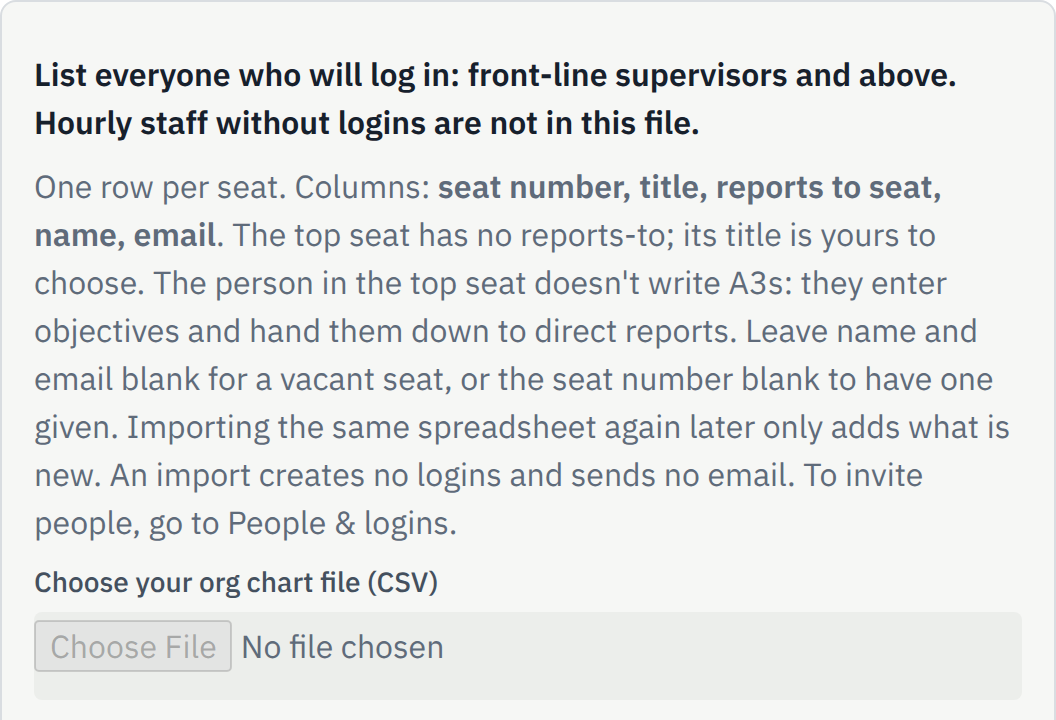
Sample data, Corbel Ridge Manufacturing (fictional). Hand objectives down in words
The top seat writes the company's objectives and hands them to direct reports. A hand-down goes one level at a time, to a direct report. The database refuses a hand-down to a peer, or one that skips a level.
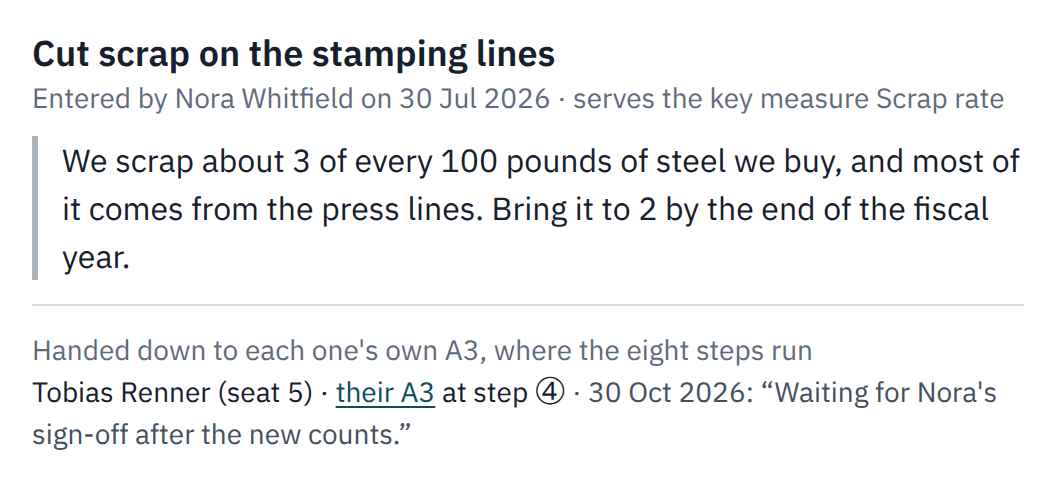
Work on an A3
An objective arrives as step 1 of an A3. The person who holds it works the steps, and the supervisor signs off each one.
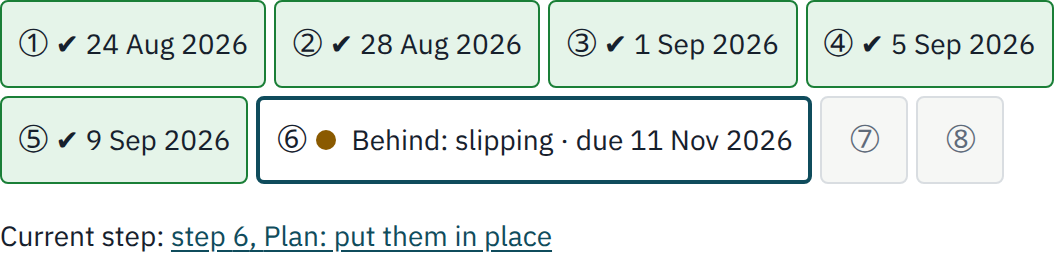
Hold your one-on-ones
You set the schedule, and you need to keep it, because the one-on-one is the only meeting the app holds. Each one-on-one shows a summary of what changed. You add comments and private notes, and one Approve marks it as held.
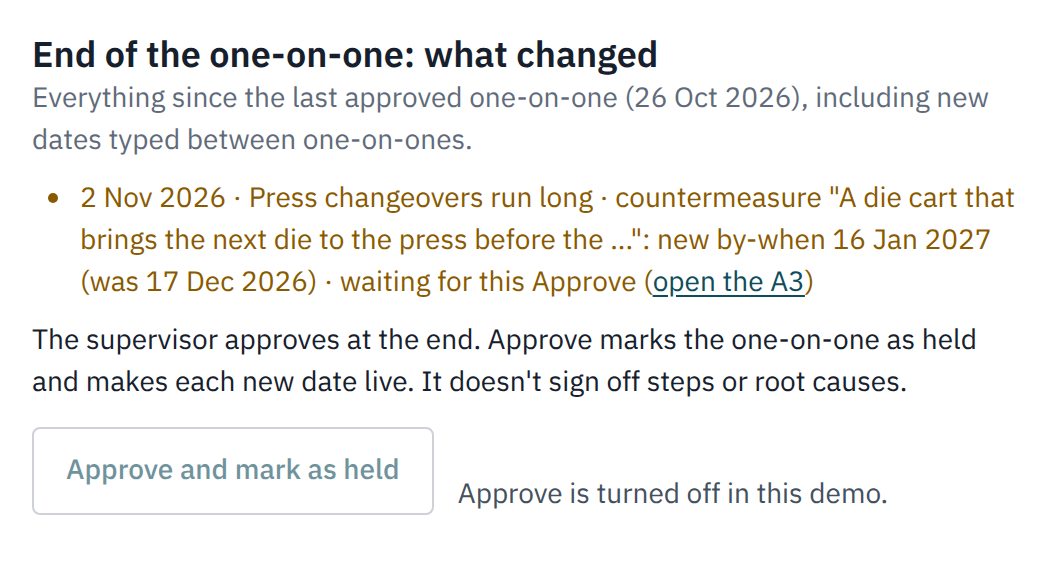
Read the board and the reports
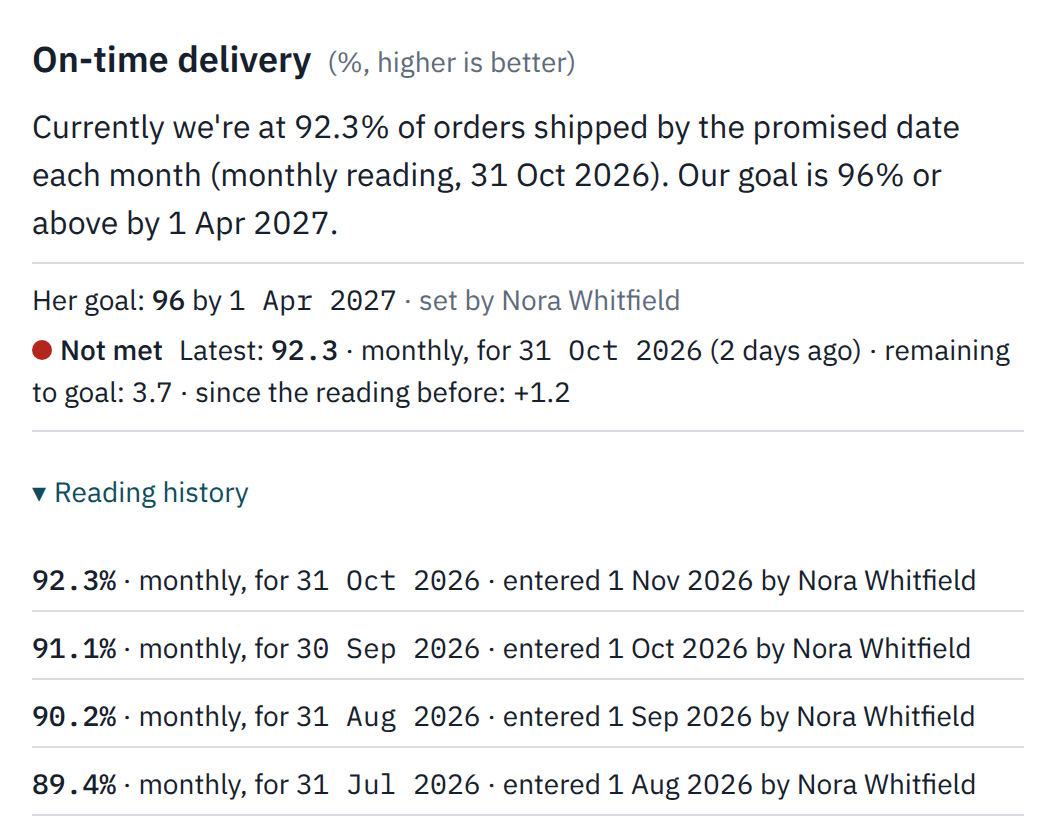
The KPI board shows each person's goal and latest reading. Reports show today or any period. You can print them or download a CSV file.
The org chart holds it together
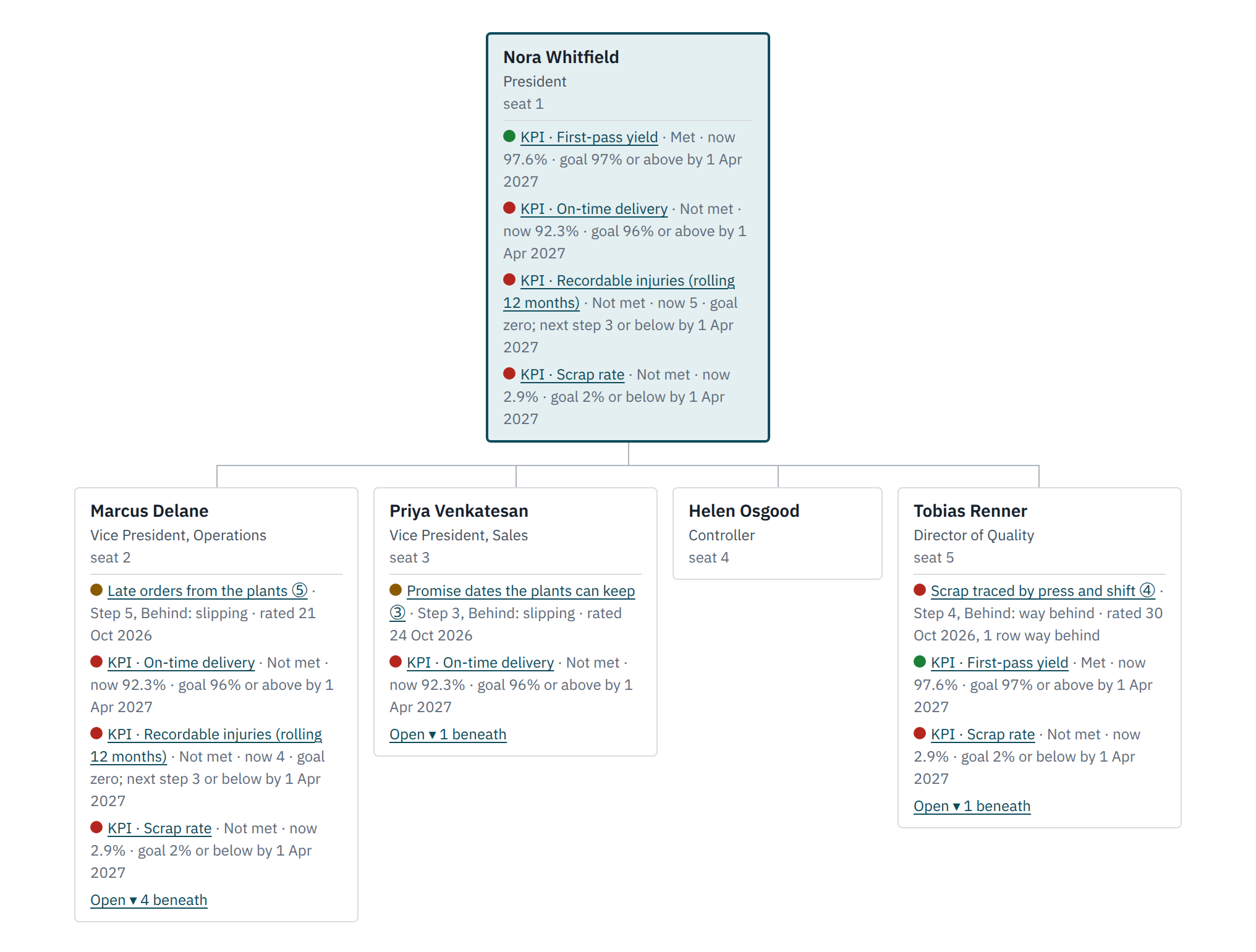
You see your own seat and the seats below it. The one box above you shows a name and a title. You can't read a peer's work. Company admins can read every seat.
Status rolls up, substance stays put. What rolls up is whether a goal is being met and the size of the gap. The A3 stays with the person who holds it. A supervisor can read it and signs off its steps, but doesn't write it.
Work across peers
You can't read a peer's work, and no setting opens it. Two VPs who serve the same goal can't read each other's A3s. Only the people above both of them, and your company admins, can read both.
You agree on work between peers outside the app. Step 8, "Standardize and share", holds the words you type. It sends them to nobody, so you share them in your own meeting.
The eight A3 steps
After step 8, the A3 loops back to step 4 for the next point of occurrence, against the same goal.
| Step | What you do |
|---|---|
| 1 | Define the problem and the gap |
| 2 | Break it down with data |
| 3 | Set a target against the opportunities |
| 4 | Prioritized problem and point of occurrence: why it happens |
| 5 | Countermeasures, ranked |
| 6 | Plan: put them in place |
| 7 | Check the process and the results |
| 8 | Standardize and share |
The record only grows
A change is a new dated row, and effective dates are today or later. When the words of a goal change, the seat above writes a new version and gives the reason. The earlier words stay in the history.
The app records numbers as people type or import them. It doesn't compute a rollup of numbers, and it doesn't check that the goals below add up to the goal above.
What your company has to do
- Setup. One company admin imports the org chart and invites people. We don't offer setup help or training yet.
- What supervisors learn. Supervisors need to learn the eight A3 steps and how to sign one off. The app's Help page, the A3 article and the free A3 builder are what we have.
- Time. No customer has run the app yet, so we have no measured figure for setup or for each manager's week. Try it on one branch before you decide.
- A pilot. You can import one plant's org chart as its own company. Its manager takes the top seat, which sets objectives and doesn't run A3s.
- A 30-day trial. You can import your chart, start A3s and hold one-on-ones. A pair that meets every four weeks meets once or twice, and the demo's A3s run for months, so don't expect to finish one.
The words we use
| Word | What it means |
|---|---|
| Seat | A numbered box on the org chart. A person sits in a seat. It isn't a paid license. |
| Top seat | The seat that reports to nobody. It sets objectives, hands them down and doesn't run A3s. |
| Hand-down | Giving an objective or a gap to a direct report. It becomes step 1 of that person's A3. |
| New words | A new version of a hand-down, with the reason. The earlier words stay in the history. |
| Point of occurrence | The place where a problem starts: the machine, the job or the step. |
| Approve | The one action that marks a one-on-one as held. It signs off no A3 steps. |
| Master | The company's top admin role. It does what a Company Admin does, changes roles and can act as someone else. Each time goes on the record. |
What Run Hoshin does not do yet
You should know this before you start a trial. We publish no roadmap and no dates for these items, so don't plan on any of them.
The app covers the deploy, implement and review parts of a Hoshin cycle. It doesn't cover long-range planning or the year-end reset. You do those outside the app.
Hoshin forms and meetings
- X-matrix. The app has no X-matrix screen and no place for long-range or breakthrough objectives. The free X-matrix builder makes one, but the app can't import that file, so you retype each objective.
- Bowling chart. The app has no bowling chart screen and no target for each period. A goal holds one number and one date. Its light stays red until the latest reading meets that number, even while the reading improves. Past readings show as a list, with no trend chart.
- Catchball. The app has no catchball tracking. You hold that talk in person. The app records the agreed words, not the offers, counters or asks.
- Review meeting. The app has no meeting screen for a monthly or quarterly review. The one-on-one is the only meeting it holds. For a review, you print a report or download a CSV file.
- Lateral hand-downs. The app refuses a hand-down to a peer, or one that skips a level. It has no place to record a dependency between peers, so you agree on those outside the app. No setting lets peers read each other's work.
- One-sheet A3. On screen, an A3 is a stack of steps, not one sheet, and the app has no one-page print view. It has no file attachments, charts or photos, so you type your data into the steps. You rank countermeasures in words, and the app computes no risk score.
Numbers and people
- Number math. The app records numbers as people type or import them. It doesn't compute a rollup of numbers, and it doesn't check that the goals below add up to the goal above.
- Org chart shapes. One person holds one seat at a time, and each seat reports to one seat above. The app has no dotted lines and no way to hand your sign-offs to a stand-in. When a supervisor is away or a seat is empty, a company admin can sign off instead.
- AI coach. The app has no AI coach and no other AI feature.
Access, data and payment
- SSO and SOC 2. The app has no SSO, and we have no SOC 2 report. A company admin can't require two-step sign-in for everyone.
- Mobile apps. The app has no native mobile apps.
- Integrations. The app has no integrations with ERP or HR systems, and no public API. You bring in KPI readings and your org chart as CSV files.
- Readable export. The whole-company export is one NDJSON file, which suits a developer or another program, not a spreadsheet. Reports download as CSV files.
- A second company. One email address holds one login, so you can't use the same address for a second company.
- Payment. You can't pay yet. Checkout stays hidden until we open it. See when the trial ends.
Try it with sample data
You can start on your own.